
Sistemi DIGIVISION FD300
basati su
hardware Darim
FD300
scheda PCI Video Broadcast Full D1
con Cattura Live, Effetti Digitali,
Chroma Key, Titolazione e Playback.
Include l' SDK per lo sviluppo di Software Custom
ed
Applicazioni Speciali, ideale per
OEM / VAR
Forward
Overview
Basic Innovative Capture/Editing/Playback hardware and software
Titling Multi-layer, multi-region titling with ad, logo and clock insertion
OnAir Multi-format content playout on schedule and studio automation
PostPlay Continuous capture, real time editing and instant re-play capabilities
Keying Flexible chroma keying software and 2D virtual studio
Streaming Advanced A/V streaming for Broadcasters and Internet content providers |
Common Features
- Several types of break-out boxes or cables for integration with any A/V equipment
- Dedicated DSP for special processing of video and audio
- Optional de-interlacing and 3D noise reduction filter for improved video compression
- Dual-channel video TBC function using onboard frame sync buffer
- Genlock is available for multiple simultaneous video outputs
- Optional SDI video input/output using digital expansion bus
- Internal 6-channel audio mixer with balanced or unbalanced I/O connectors
- Optional digital audio I/O via SPDIF or AES/EBU connectors
- Up to 4 interface cards can be installed into a single PC
- Windows 2000/XP/2003 compatible drivers, control and application software
- Selection of optimized kits for system integration and OEM applications
- Variety of comprehensive SDKs are available upon request
|
Forward Basic
Multi-format A/V Capture/Editing/Playback Kit
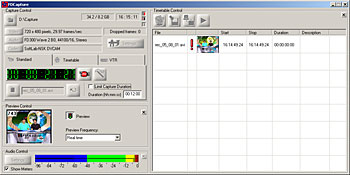 Forward Basic kit comes standard with innovative Forward Capture™ application, for taking video and audio in as AVI files. A wide variety of AVI formats are available from uncompressed to DV, DVCPRO, MJPEG, and I-frame MPEG2 as well as several popular third-party formats. Users can quickly and easily capture clips of any duration, size and selected formats in either manual, scheduled or remote VTR-control modes. Low compression or uncompressed video capture is essential when ingesting the highest quality A/V content for editing and post-production. Forward Basic kit comes standard with innovative Forward Capture™ application, for taking video and audio in as AVI files. A wide variety of AVI formats are available from uncompressed to DV, DVCPRO, MJPEG, and I-frame MPEG2 as well as several popular third-party formats. Users can quickly and easily capture clips of any duration, size and selected formats in either manual, scheduled or remote VTR-control modes. Low compression or uncompressed video capture is essential when ingesting the highest quality A/V content for editing and post-production.
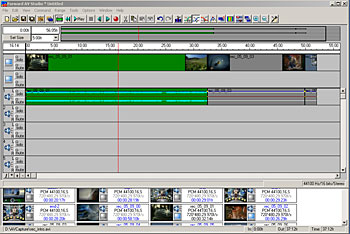 Great audio is the secret behind any successful video production. With Forward AV Studio™, editing engineers can choose from up to 32 high quality audio tracks to create outstanding video productions. Included are plenty of audio effects for added dimension. Two tracks of video enable users to quickly create mark in and out points to cut and join different clips and their segments. Playback of the whole or selected portion of the project to a video monitor can be commenced immediately by pushing a button without rendering or recompression. Non-destructive editing technology leaves source audio and video files intact, enabling users to save results of their editing in a separate timeline file or export them into industry standard AVI formats. Great audio is the secret behind any successful video production. With Forward AV Studio™, editing engineers can choose from up to 32 high quality audio tracks to create outstanding video productions. Included are plenty of audio effects for added dimension. Two tracks of video enable users to quickly create mark in and out points to cut and join different clips and their segments. Playback of the whole or selected portion of the project to a video monitor can be commenced immediately by pushing a button without rendering or recompression. Non-destructive editing technology leaves source audio and video files intact, enabling users to save results of their editing in a separate timeline file or export them into industry standard AVI formats.
The Basic kit maybe integrated with third-party multimedia software for Windows 2000 and later platforms via industry standard video capture and sound recording/playback drivers. A special Video and Audio DSP plug-ins for Windows Media Player 9 and later enables users output any type files to video monitor and other studio equipment.
|
Forward Titling
Flexible multi-layer title and CG creation kit
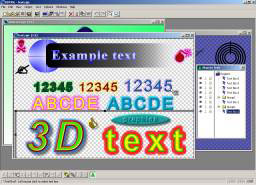 Forward Titling kit allows users to explore and utilize a powerful multi-layered, multi-region titling engine of the Forward hardware. The Forward Title application enables graphic designers to create a virtually unlimited number of text styles, using any fonts supported by Windows OS, including Asian. Title text can be arranged for crawling and rolling appearance on the screen. Any type and shape of 2D graphics elements with 255 levels of transparency can be created here and integrated with text. Results can be previewed on the video monitor with a push of a button and exported to graphic files for composing the final on-screen layout. Forward Titling kit allows users to explore and utilize a powerful multi-layered, multi-region titling engine of the Forward hardware. The Forward Title application enables graphic designers to create a virtually unlimited number of text styles, using any fonts supported by Windows OS, including Asian. Title text can be arranged for crawling and rolling appearance on the screen. Any type and shape of 2D graphics elements with 255 levels of transparency can be created here and integrated with text. Results can be previewed on the video monitor with a push of a button and exported to graphic files for composing the final on-screen layout.
The provided software may also be used in non-interactive mode for automatic updates of text and images on the screen.
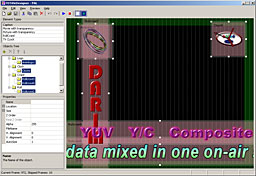 A powerful Forward Title Designer program provides CG specialists to produce a realistic layout of all graphic elements, as would be seen on the video screen. It is possible to insert static images, animated logos, sequence of banner ads, special effect clips, analog or digital clocks and multiple instances of horizontal or vertical text. Various onscreen elements can be overlapping each other and provide designer with a number of properties to adjust, such as speed, direction and Z order. The results can be previewed on PC screen in real time and then mixed with any live or recorded video content using the FD300 hardware and Forward Title Player as well as the OnAir software. A powerful Forward Title Designer program provides CG specialists to produce a realistic layout of all graphic elements, as would be seen on the video screen. It is possible to insert static images, animated logos, sequence of banner ads, special effect clips, analog or digital clocks and multiple instances of horizontal or vertical text. Various onscreen elements can be overlapping each other and provide designer with a number of properties to adjust, such as speed, direction and Z order. The results can be previewed on PC screen in real time and then mixed with any live or recorded video content using the FD300 hardware and Forward Title Player as well as the OnAir software.
|
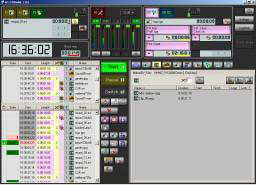 Whatever the video content type, format and schedule may be the Forward OnAir™ software will make it easy to organize it and ensure perfect sequence and timing of execution. The OnAir kit can handle up to 3 live A/V sources, AVI and MPEG2 clips in multitude of formats, still images, separate audio tracks, multi-layer titles, animated CG with transparency and specially designed onscreen clocks. The program editor may define the desired duration for specific items, trim existing video clips and enable soft fade in/out transitions. Special features include two separate scheduling panels for independent program editing and playout by timer, operator control or GPI trigger. In case of unplanned events, the operator may use manual program override controls to enable live A/V pass-through, bring up an emergency still image, show or hide graphics/titles. Whatever the video content type, format and schedule may be the Forward OnAir™ software will make it easy to organize it and ensure perfect sequence and timing of execution. The OnAir kit can handle up to 3 live A/V sources, AVI and MPEG2 clips in multitude of formats, still images, separate audio tracks, multi-layer titles, animated CG with transparency and specially designed onscreen clocks. The program editor may define the desired duration for specific items, trim existing video clips and enable soft fade in/out transitions. Special features include two separate scheduling panels for independent program editing and playout by timer, operator control or GPI trigger. In case of unplanned events, the operator may use manual program override controls to enable live A/V pass-through, bring up an emergency still image, show or hide graphics/titles.
These capabilities position the Forward OnAir server as a likely replacement for multiple VTR players, still storages and titling systems in small or medium-size studios. In addition, the server can be easily integrated into existing broadcast studio computer and storage networks via Ethernet and GPI interfaces, including remote control. In a networked environment, it supports easy schedule, playout log and content sharing as well as data export into Excel spreadsheet. Scalable and highly optimized hardware and software design permits doubling the number of playout channels per OnAir server node by simply installing a new FD300 interface card.
|
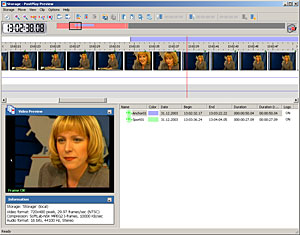 An optional addition to the OnAir server, the Forward PostPlay™ software provides users with new concept of live A/V content processing. The live feed from a satellite or terrestrial channel is continuously recorded into a local or network disk storage of desired capacity. The storage may contain anywhere from several minutes to several days worth of recorded A/V data, depending on the quality/compression and type of hard disk used (IDE, SCSI or NAS). As soon as recording begins, the stored data is available for real time mark-in/mark-out editing. Then, each segment is available for immediate or scheduled (delayed) playback using the Forward OnAir software. The maximum duration of this replay delay is defined by the storage capacity. A single FD300 interface kit is sufficient to handle full replay operation cycle from A/V ingest to delayed playout. High-end systems may be equipped with additional interface card/kit to handle two independent replay channels simultaneously. An optional addition to the OnAir server, the Forward PostPlay™ software provides users with new concept of live A/V content processing. The live feed from a satellite or terrestrial channel is continuously recorded into a local or network disk storage of desired capacity. The storage may contain anywhere from several minutes to several days worth of recorded A/V data, depending on the quality/compression and type of hard disk used (IDE, SCSI or NAS). As soon as recording begins, the stored data is available for real time mark-in/mark-out editing. Then, each segment is available for immediate or scheduled (delayed) playback using the Forward OnAir software. The maximum duration of this replay delay is defined by the storage capacity. A single FD300 interface kit is sufficient to handle full replay operation cycle from A/V ingest to delayed playout. High-end systems may be equipped with additional interface card/kit to handle two independent replay channels simultaneously.
The amazing features of the OnAir/PostPlay server create a new range of cost-effective solutions for instant replay applications. The solutions may be economical, designed to fit all in one box or multi-tier distributed over high-speed Gigabit or fiber optic networks with separate systems handling live content ingesting, editing, schedule creation and playout of the programs.
|
Forward Keying
Professional color keying and real time 2D video effects
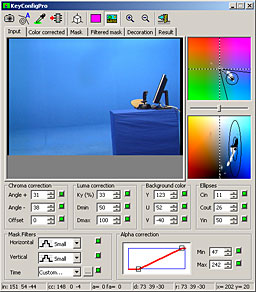 One of the special applications of the versatile family of Forward kits is chroma keying and 2D video/CG mixing associated with this. The Forward Keying software package features one of the simplest and effective chroma keying algorithm in the industry! It combines scores of advanced keying setup parameters with simple one-click automatic configuration! In addition, the Forward Keying works with wide range of video cameras, from consumer camcorders (over S-Video connection) to broadcast studio (SDI is recommended). In fact, users may have two cameras connected to the system and switch their input as desired. One of the special applications of the versatile family of Forward kits is chroma keying and 2D video/CG mixing associated with this. The Forward Keying software package features one of the simplest and effective chroma keying algorithm in the industry! It combines scores of advanced keying setup parameters with simple one-click automatic configuration! In addition, the Forward Keying works with wide range of video cameras, from consumer camcorders (over S-Video connection) to broadcast studio (SDI is recommended). In fact, users may have two cameras connected to the system and switch their input as desired.
The results of chroma keying can be obtained from the output (real time video + key) or mixed with one of the supported backgrounds. Depending on the selection, it can be a live video from the second input of the system, still image or AVI/MPEG2 clips. The input video or the mixing results can be automatically saved to hard disk for editing and post-production purposes.
The Forward Keying kit may be bundled with high quality backdrop fabric and other accessories that help to setup cost-effective and high quality color keying environment suitable for fixed or mobile installations.
|
Forward Streaming
Highest quality A/V streaming hardware for broadcasting and webcasting
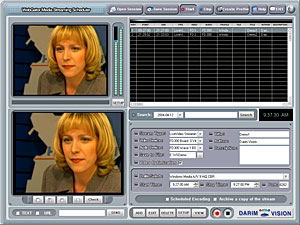 Wide range of supported video and audio inputs and specialized video processing makes Forward Streaming kit a desirable part of a multimedia encoder system. The encoder will convert live video and audio feed into one of the leading compression formats and send it over the network, satellite channel or the Internet. The most important distinction from the competition is the video source de-interlacing and adaptive 3D noise reduction filters implemented inside the Forward hardware. Wide range of supported video and audio inputs and specialized video processing makes Forward Streaming kit a desirable part of a multimedia encoder system. The encoder will convert live video and audio feed into one of the leading compression formats and send it over the network, satellite channel or the Internet. The most important distinction from the competition is the video source de-interlacing and adaptive 3D noise reduction filters implemented inside the Forward hardware.
The Forward Streaming kit is available in two versions, depending on the encoding formats: Microsoft Windows Media 9 (WM9) format and H.264/Advanced Video Coding (H.264/AVC) format. The WM9 format is currently used for live webcasting and VOD over the Internet. It provides very good compression ratio and quality acceptable for most consumers. On the other hand, the H.264 (AVC) format is new and not widely available yet. However, it allows squeezing broadcast quality D1 resolution video to bitrates of 1500 Kbps and lower! This makes it ideal for professional applications to transmit video and audio over great distances using inexpensive communication links. Lower resolution video for Internet users may yield compression ratio 30-50% higher than that of WM9 at the same or better video quality.
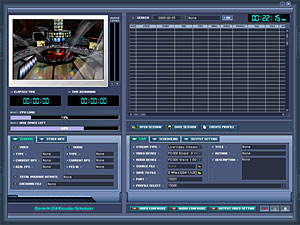 The two versions of the Forward Streaming kit each come with innovative and user-friendly software that enables users to perform encoding and streaming manually or automatically on specified schedule. Users can select, modify and create new encoding and streaming profiles depending on the available network bandwidth, application target audience and other factors. The A/V data encoded in real time and available for streaming can be automatically saved to hard disk as well. Additionally, a special non-real time, two-pass video encoding can be used to achieve an even better quality and smaller file sizes for VOD applications. The two versions of the Forward Streaming kit each come with innovative and user-friendly software that enables users to perform encoding and streaming manually or automatically on specified schedule. Users can select, modify and create new encoding and streaming profiles depending on the available network bandwidth, application target audience and other factors. The A/V data encoded in real time and available for streaming can be automatically saved to hard disk as well. Additionally, a special non-real time, two-pass video encoding can be used to achieve an even better quality and smaller file sizes for VOD applications.
The encoded WM9 content can be played by Windows Media Player 9 or later software readily available in most Windows systems and even in Mac OS X. However, the H.264/AVC player is subject to licensing and may have limited availability and/or cost associated with it.
NOTE: the Forward Streaming kit is incompatible with certain other Forward software applications.
|
Forward
Hardware Specifications
| Input Video Formats: |
NTSC, PAL or SECAM software selectable
NTSC: 720x480 or 352x480 at 29.97 fps
PAL/SECAM: 720x576 or 352x576 at 25 fps |
| Output Video Formats: |
NTSC, PAL or SECAM (optional) software selectable
NTSC: 720x480 at 29.97 fps
PAL, SECAM: 720x576 at 25 fps |
| Internal Video Processing: |
YUV 4:2:2 or YUVα 4:2:2:4, 8 bit |
| Video Inputs: |
Composite (BNC): up to 12 (1.0 Vp-p, 75 Ohm)
S-Video (4-pin mini-DIN): up to 6 (Y: 1.0 Vp-p, 75 Ohm; C: 0.286 or 0.3 Vp-p at burst level, 75 Ohm)
Component RGB (BNC): up to 3 (R/G/B: 1.0 Vp-p, 75 Ohm) with Int. or Ext. sync
Component YUV (BNC):up to 3 (Y: 1.0 Vp-p, 75 Ohm; U/V: 0.7 Vp-p, 75 Ohm) with Int. or Ext. sync
SDI (BNC): (SMPTE 259M-C, 270 Mbps) – optional via add-on card
The maximum possible number of inputs is shown, certain inputs are mutually exclusive. Some connectors may not be available in all cables/break-out boxes. Inputs are software selectable except certain RGB/YUV ext. sync selections |
| Video Outputs: |
Composite (BNC): up to 12 (1.0 Vp-p, 75 Ohm)
S-Video (4-pin mini-DIN): up to 6 (Y: 1.0 Vp-p, 75 Ohm; C: 0.286 or 0.3 Vp-p at burst level, 75 Ohm)
Component RGB (BNC): up to 3 (R/G/B: 1.0 Vp-p, 75 Ohm) with Int. or Ext. sync
Component YUV (BNC): up to 3 (Y: 1.0 Vp-p, 75 Ohm; U/V: 0.7 Vp-p, 75 Ohm) with Int. or Ext. sync
SDI (BNC): (SMPTE 259M-C, 270 Mbps) – optional via add-on card
The maximum possible number of inputs is shown, certain inputs are mutually exclusive. Some connectors may not be available in all cables/break-out boxes. Inputs are software selectable except certain RGB/YUV ext. sync selections |
| Audio Input/Output: |
Analog Inputs (XLR balanced or unbalanced): microphone-level or line-level; up to 6 mono/3 stereo channels
Analog Outputs (XLR balanced or unbalanced): line-level; up to 6 mono/3 stereo channels
Digital Inputs/Outputs: SPDIF (RCA) or AES/EBU (XLR) digital audio -- optional
All inputs maybe mixed into selected outputs with programmable delay (up to 1000 ms) for proper A/V synchronization.
Certain types of I/O connections may require optional cables or break-out boxes |
| Time Base Correction: |
Individual Time Base Correction (TBC) for each video input and common Frame Sync Buffer allow for real time switching between 2 asynchronous analog/digital video sources without dropped frames or distortions |
Color Keying/Alpha channel:
( optional in Keying package ) |
Automatically generated or custom table-based color keying with color correction, key-mask filtering and clipping.
Real time alpha channel/key output (analog only) |
Video Processing/Filtering:
( optional in Streaming package ) |
Motion-adaptive 3D noise reduction filter
Selectable de-interlacing filter |
| Genlock |
MAll analog and/or digital video outputs can be synchronized to selected external reference video signal (analog only) |
| Physical and Electrical: |
Form Factor: 2/3 size PCI 2.2 card (32-bit, 5V/3.3V universal)
Uses 62-pin DSUB connector for most input/output connections
Power requirements: 12V/0.3A, 5V/1.1A or 3.3V/1.8A |
Specifications and system requirements subject to change without notice |
Forward
System Requirements
| Package Name |
Required |
| CPU |
RAM |
HDD |
Network |
| Basic / Keying |
Pentium III
1 GHz |
256 MB |
20 GB |
- |
| Titling / OnAir |
Pentium 4
2.4 GHz |
512 MB |
40 GB |
- |
| PostPlay |
Pentium 4
2.4 GHz |
512 MB |
100 GB |
- |
| Streaming |
Pentium 4
3.0 GHz |
512 MB |
20 GB |
100 Mbps |
| Software |
Microsoft Windows 2000 SP4
DirectX 8.1b |
| Package Name |
Recommended |
| CPU |
RAM |
HDD |
Network |
| Basic / Keying |
Pentium 4
3.0 GHz |
512 MB |
40 GB
ATA |
100 Mbps |
| Titling / OnAir |
Pentium 4
3.0 GHz |
512 MB |
100+ GB
S-ATA
RAID |
1 Gbps |
| PostPlay |
Pentium 4
3.2 GHz |
1 GB |
200+ GB
S-ATA
RAID/NAS |
1 Gbps |
| Streaming |
Dual Xeon
3.0 GHz |
1 GB |
120 GB +
NAS |
1 Gbps |
| Software |
Windows XP SP2 or Windows 2003 Server
DirectX 9.0c, NET Framework 1.1 SP1 |
|
Scarica la documentazione sulle schede Darim FD series in formato PDF
CHI SIAMO | NOVITA' | PRODOTTI | ORDINI / OFFERTE | SERVIZI | SUPPORTO TECNICO
DIGIVISION ha cambiato sede !
DIGIVISION has moved to the new office !
DIGIVISION srl - Viale Piave 3 - 20129 MILANO Italy
telefono ++39 02 7600 7932 - fax ++39 02 7601 6305
per contattarci e-mail: vendite@digivision.it
|
|
