Digivision

PROXSYS

Media Asset Management

Many businesses and organizations are adopting Media Asset Management as a business strategy because managing video and other media assets present unique challenges and requires solutions designed specifically to streamline the acquisition, storage and retrieval of digital media. With the ProxSys line of media asset management solutions from Focus Enhancements, you can reduce the time and cost of content production, maximize the return on investment (ROI) from your media assets, bring new products and services to market faster and streamline compliance. Designed by media professionals for media professionals, ProxSys solutions enable you to cost-effectively optimize media asset management across your organization.

Optimize media asset management

Broadcasting

Manage broadcasts 24/7 with limited resources. Combine live and pre- recorded video. Generate program listings automatically. Even schedule playback for content that has not yet been created.

Distance Learning

Amortize your investment in training content and maximize the reach of your training personnel. Improve performance and reduce risk by ensuring consistency and quality across training sessions.


Digital Archiving

Create a comprehensive digital library of video and other media assets. Enable others to search, preview, and acquire media assets while protecting your intellectual property rights.


Research

Document and store critical information throughout the research and development process. Easily reference and retrieve information to assess quality and ensure compliance.

The Digivision solution for complete Media Asset Management

With an intuitive browser-based interface, robust features, and usage-based pricing, the complete line of ProxSys™ Media Asset Management solutions from Focus Enhancements makes media asset management simple and cost-effective. With ProxSys, you can integrate your entire workflow, including acquisition, storage, and distribution, to gain unparalleled efficiencies. Designed for fast performance, ProxSys uses rich metadata to make it easy to find and retrieve items quickly. Low-resolution MPEG-4 proxy video clips allow for quick preview, protect high-resolution media assets, and save network bandwidth. By combining the flexibility and scalability of a custom system with the implementation time and ownership cost of an “out of the box” solution, ProxSys gives you the performance you want for a price you can afford.

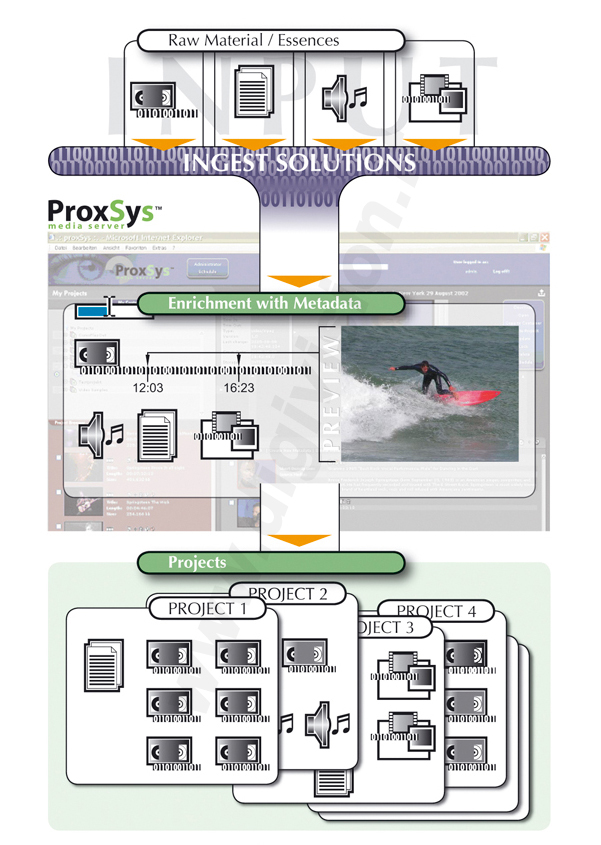
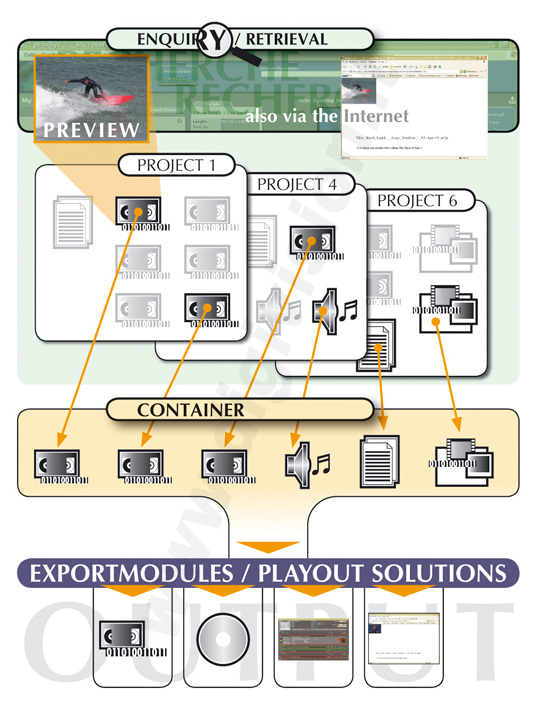
ProxSys Media Server Workflow


IN workflow (click to enlarge)
OUT workflow (click to enlarge)
 
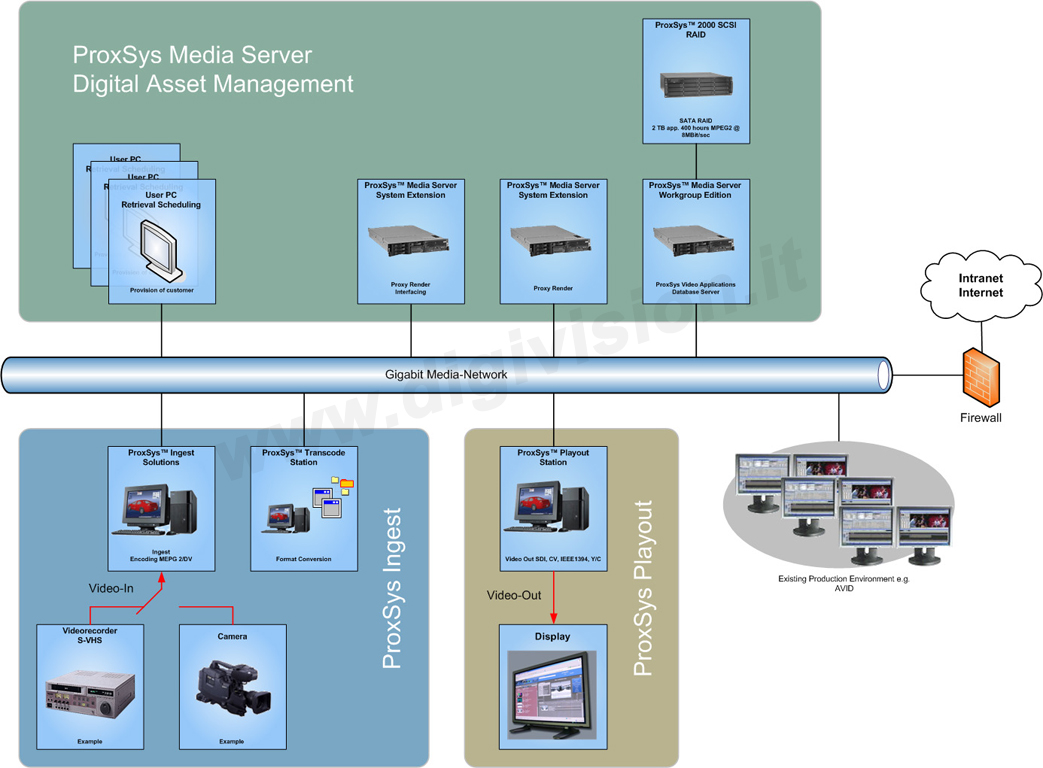
ProxSys Media Server Basic System layout


(click to enlarge)


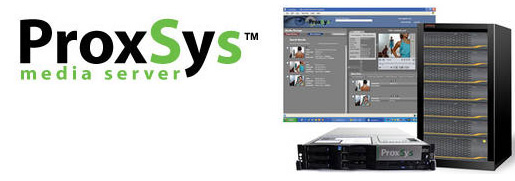
ProxSys Media Server

A fully integrated hardware and software solution brought to you by Digivision Milano, the ProxSys Media Server is custom-configured for the number of users in your organization. The intuitive browser-based interface provides immediate access to audio, video, images, and data from any location. Functionality includes online and offline usage, MPEG and DV support, and complete NLE format compatibility.

 
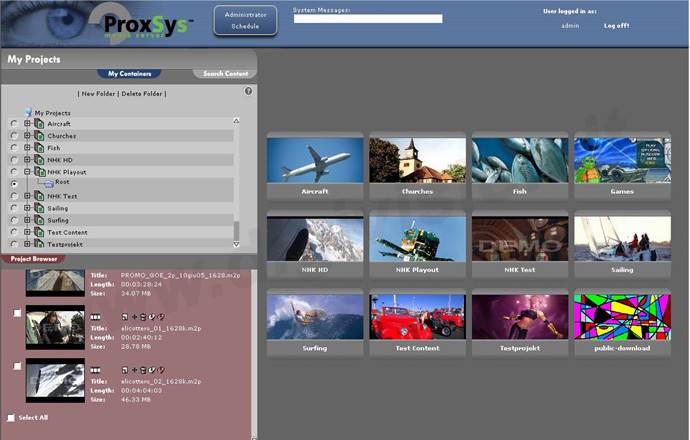
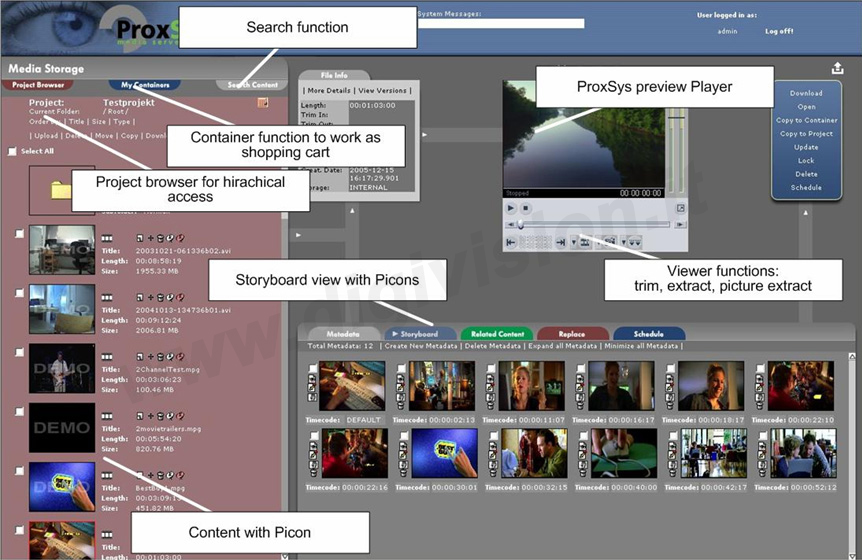
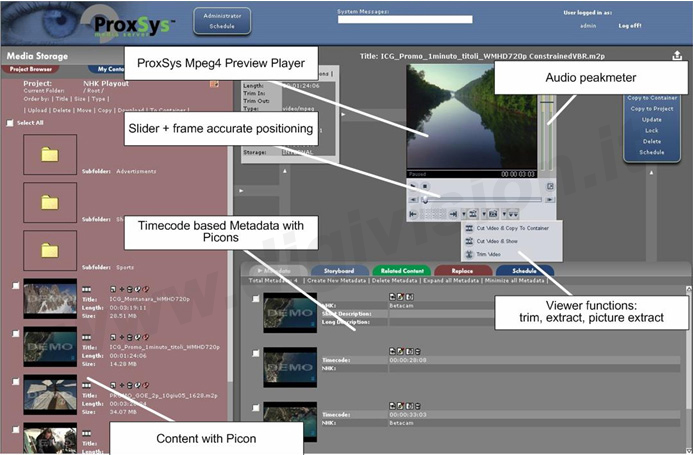
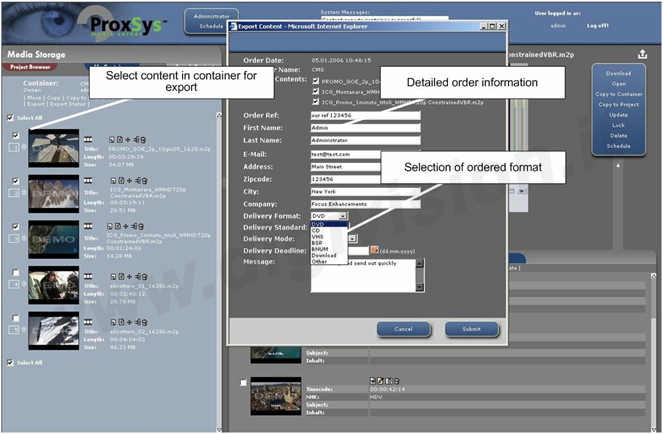
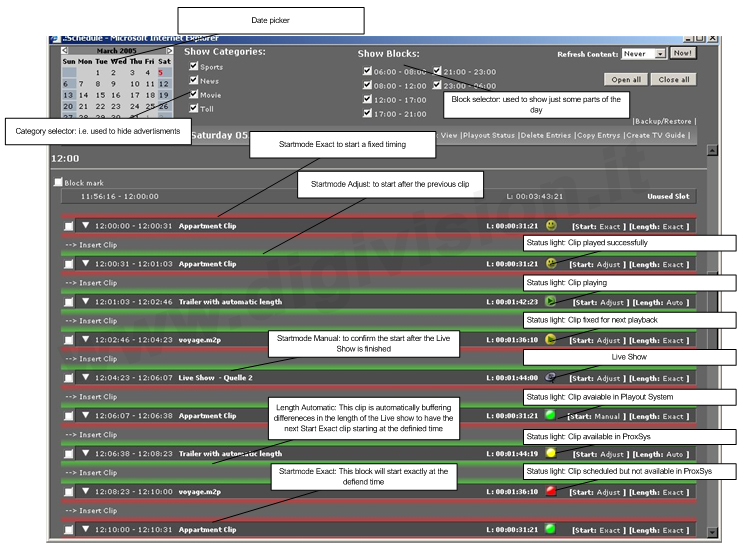
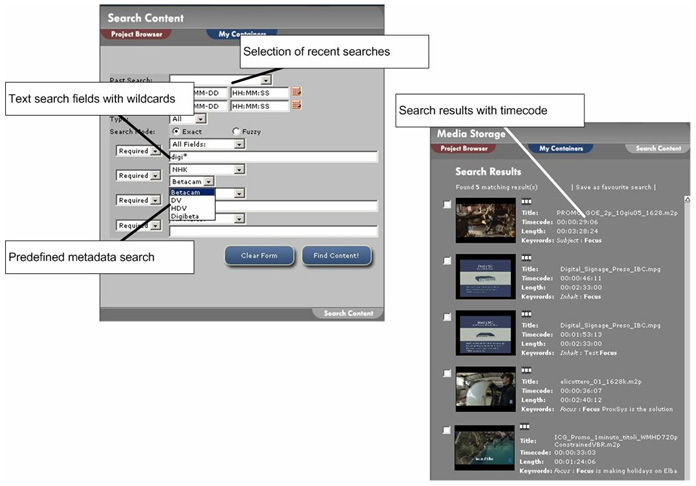
ProxSys User Interface screenshots


The easiest and most flexible way to store, manage and recall your digital media is ProxSys™ Media Server a new Media Management Server brought to you by Digivision Milano. ProxSys manages from 1.6 to 50TB of low and high resolution video, audio, images and data from a simple web browser interface allowing quick access to your clips from any location. ProxSys will revolutionize media management for broadcast, online media content sales, TV monitoring, education and industrial applications.

Gone are the days of managing large numbers of videotapes, CD-ROMs, audio CDs and digital images within your organization. ProxSys allows you to efficiently manage your digital media assets on one system and makes those images available to anyone, anywhere and at anytime with a simple web browser interface.

ProxSys is based on several different components. The main ProxSys DataStorage and Administration component forms the heart of the system and contains the database, webserver, video archive, metadata storage and the MPEG-4 compression engine. The ProxSys MPEG/DV encoding component allows video and other content to ingest into the system. Finally, the Play-out component controls distribution of the content.

After video is ingested into ProxSys, a low resolution MPEG-4 proxy of the clip is created along with the high resolution DV or MPEG-2 version. When it comes to searches, the client is able to view this proxy version of the file prior to receiving the full resolution version.

ProxSys categorizes stored media content based on up to 64 customizable metadata fields that correspond to media timecode data. Different parts of a single media file can be tagged with different metadata information. When it comes time to retrieve that media, only the relevant portion of the clip is presented to the recipient. Before downloading the full resolution clip, the user can additionally edit the portion of the clip(s) required saving both download time and streamlining workflow.

It is possible to allocate different levels of access rights for ProxSys users. For example, the administrator can place different security levels on all content for different users or user groups. This is particularly important for applications such as online content sales.

Not only is it possible to view and download content to a remote client, it is also possible to play-out selected media via the optional MPEG-2 Play-out Station. The Play-out station allows for transfer of files to other MPEG-2 play-out systems or to a computer system. In addition, you can export content directly to an NLE system for editing purposes and alternatively, export selected media to a CD or DVD burner.

Projects are intended to store all content of a customer project in a central and organized folder structure. Content can be shared across different projects, but specific metadata can be defined for each project. Project structures are created from project templates. Metadata can also be used for project description.

ProxSys Ingest Solution

Supporting DV, DVCAM, or MPEG-2 encoding, the ProxSys Ingest Solution enhances your workflow by enabling you to ingest, index, and upload multiple channels of analog or digital video to the ProxSys Media Server. Through it’s intuitive interface, the ProxSys Ingest Solution delivers the functionality of high-end ingest products without requiring the user to be a technical expert.

ProxSys Playout Solution

With the ProxSys Playout Solution, you can add 24/7 scheduled program playout to the ProxSys Media Server. Enjoy seamless playback of SD MPEG2, DV, or HD MPEG2 formats. The ProxSys Playout Solution also includes logo and banner insertion, switcher control, and the Focus Supervising of Scheduling tool.

Storage Options

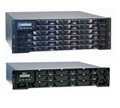
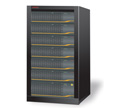
To supplement the integrated RAID 5 storage in the ProxSys Media Server, Digivision provides a number of options, including tape backup, hierarchical storage (SATA, Fiber, JukeBox), and “hot” redundant storage.


Proxsys SATA/SCSI Fiber storage:

- 2 TB up to 12 TB per unit
- Max 14 units per ProxSys server
- RAID5 storage, 600 MHz RISC architecture
- RAIDwatch management by WEB browser


Tagma Store:

- SATA drives: good performance, cost effective, capacity
- Fiber drives: high performance, fiber Interface
- Controller: 2 way redundancy


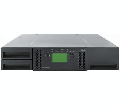
IBM TS3100 Tape Library Express 
backup and nearline storage:

- 17.6 TB (compressed)
- 8.8 TB (native)
- IBM LTO
- Ultrium
- 3 tape drive,
- 22 Tape cartridges


Applications

Broadcast Archive and Play-out
Sports Analysis
Education & Training
Online Purchase of Content
Multi Channel Record and Monitoring
Video Archiving
Network Based Talent Auditioning
 
Outstandig Features

Stores audio, video, images and data
From 1.6 to 50TB of storage
Simple web-browser user interface
Multiple levels of user rights and administration
Capture Hi-Res MPEG-2 (up to 15Mbit/s) or DV/DVCAM video
Assign clip metadata during capture
Store clips in MPEG-2, AVI or QuickTime (.MOV) formats
Assign clips to projects
Share content between multiple projects
Automatically create an MPEG-4 proxy file after upload
Assign metadata to timecode ranges in content for quick and easy searching
Up to 64 metadata fields
Create metadata for specific projects
Extract and download single frames from a video stream
Access and download only required portions of video
Download content to a local computer
Use the optional Play-out Station for MPEG-2 playback
Export clips to third party MPEG-2 Play-out systems
Export MPEG-2 clips to Play-out Server Products
Use clips directly in Non-Linear Editing Systems
Burn content directly to a CD or DVD writer
Preinstalled & configured system
No license cost for unlimited clients
Based on Linux OS & Multimedia Databas
e


CHI SIAMO | NOVITA' | PRODOTTI | PROMOZIONI | SERVIZI | SUPPORTO TECNICO

DIGIVISION ha cambiato sede !
DIGIVISION has moved to the new office !

DIGIVISION srl - Viale Piave 3 - 20129 MILANO Italy
telefono ++39 02 7600 7932 -  fax ++39 02 7601 6305

per contattarci e-mail:
vendite@digivision.it